


Manual Smart Lock Unlock: Key, 9V, Thumbturn Tips
How to manually open a smart lock?
Smart locks are designed to be convenient, but every model should still offer a way to get in when the app won’t connect, the batteries die, or the keypad isn’t responding. The right method depends on whether your lock includes a physical keyway, an exterior battery terminal, or an interior thumbturn. Start with the least invasive option and move to backups only when needed.
Manual ways to open a smart lock
1) Use the physical key (if your lock has a key cylinder)
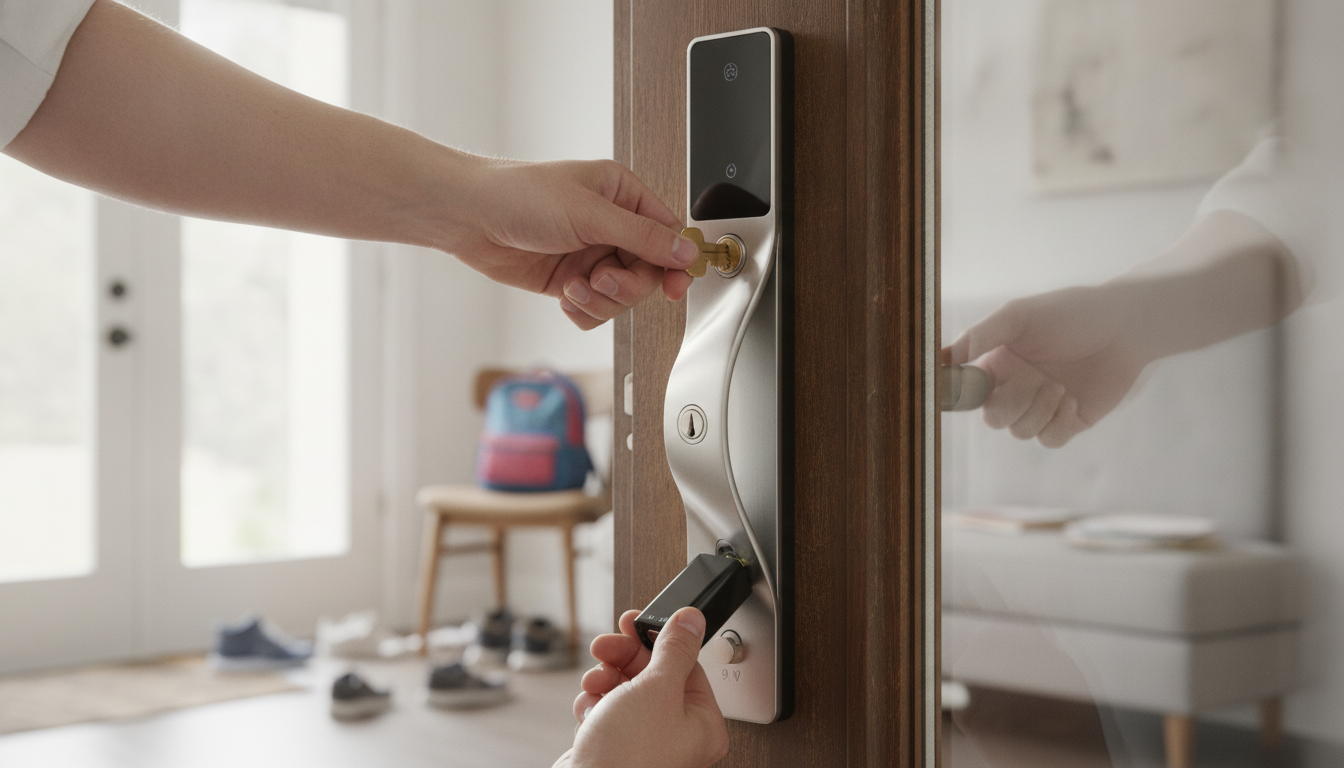
Many smart deadbolts include a traditional keyhole on the exterior side. Insert the key fully, turn it smoothly, and open the door as you would with a standard deadbolt. If the key is hard to turn, avoid forcing it; pressure on the door can bind the bolt. Pull or push the door slightly while turning the key to relieve tension.
2) Power the lock temporarily (common on keypad models)
If the keypad is dead, some locks provide emergency power contacts on the bottom or face of the exterior unit. Hold a fresh 9V battery to the terminals (match polarity if indicated), wait for the keypad to wake up, then enter your code to unlock. This doesn’t recharge the internal batteries—it just gives enough power to operate the motor once.
3) Unlock from the inside thumbturn (when you’re indoors)
If you’re locked in rather than locked out, most smart deadbolts still have an interior thumbturn or lever. Rotate it to retract the bolt. If it won’t move, check whether the door is pressing against the frame; nudging the door can reduce bolt pressure.
4) Use the manufacturer’s mechanical override (varies by model)
Some retrofit locks (that mount over an existing deadbolt) rely on the original key from outside and a motorized turner inside. Others hide a keyway behind a cover plate. If anything is unclear for your specific hardware, follow the lock’s model-specific steps here: https://agathin.com/how-to-manually-open-a-smart-lock/.
5) If none of the above work
If the lock has no keyway and won’t accept emergency power, contact the lock maker’s support or a licensed locksmith. Avoid drilling unless it’s an emergency; drilling can damage the door and hardware and may void warranties.
FAQ
What should I do if my smart lock batteries die and I don’t have a key?
Check for emergency power terminals (often compatible with a 9V battery) to wake the keypad long enough to enter your code. If your lock has no emergency power option, you’ll typically need manufacturer support or a locksmith to regain entry.













Leave a comment